
Stop writing reports
after the site visit
If your day ends with a report, Sayt is for you. Photograph a finding, measure it with the camera, pin it to the plan — and the PDF or Word document is ready before you leave. No signal, no account, no evening spent typing it all up again. Now built for both iPhone and Android crews.
Free beta · iPhone and Android · Offline · No account needed
.saytpack visits between iOS and Android crews.
Built for the people who actually walk the site
On this page
The report
The report is the job. Sayt does it on site.
The walk is the easy part. The cost is the evening afterwards — matching photos to notes, retyping the same findings, chasing the format your client, your head office or the main contractor expects. Sayt removes that evening.
Everything you record on site is already report-shaped, so generating the document is one screen and one tap. Your name, licence number, company and logo are on it. You can send it before you get back to the car.
- PDF — ready to send, no formatting needed
- Word (DOCX) — editable in Word or Pages, for teams whose template must be followed
- Photos (ZIP) — the original images at full quality
- Photos, annotations, measurements, plan pins, checklists and issue history all pulled in automatically
- Preview it before you generate it
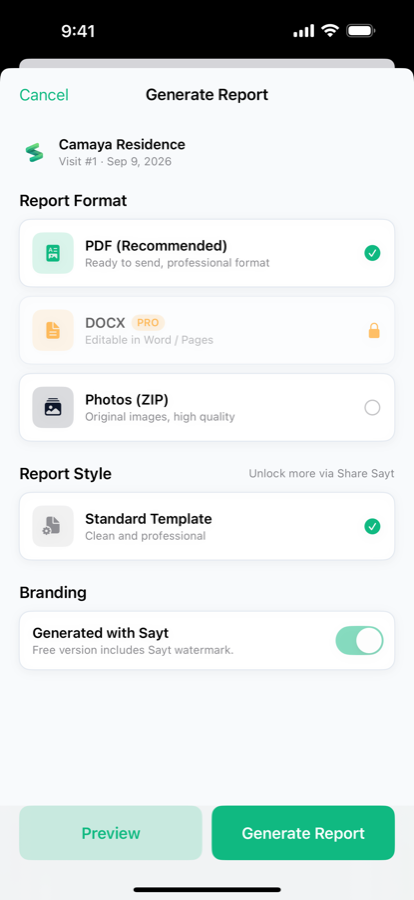
Six report templates, so the document matches the reader:
Standard
Balanced professional layout — the default.
Executive
Client-facing and polished: larger photos, softer typography, technical detail rows hidden.
Progress
Photo-led progress documentation with minimal text.
Inspection
Leads on issues, follow-ups and before/after evidence.
Minimal
Text-heavy architecture-office style, no accent bars or cards.
Punchlist table
Numbered No. | Name | Description table with embedded photos — matches typical QA/QC and DPWH tabulation.
Sample output
This is what comes out
Not mockups — these are real pages out of the generator, one for each template. The same Camaya Residence visit is shown six ways, so you can see what changes and what stays in place.
Photos, annotations, measurements and plan pins follow on the pages after it. Nothing here was typed twice: every line came from something you tapped on site.
- Your company name, logo, licence number and signature block
- Findings numbered and categorised for you
- Preview every page before you generate or send it
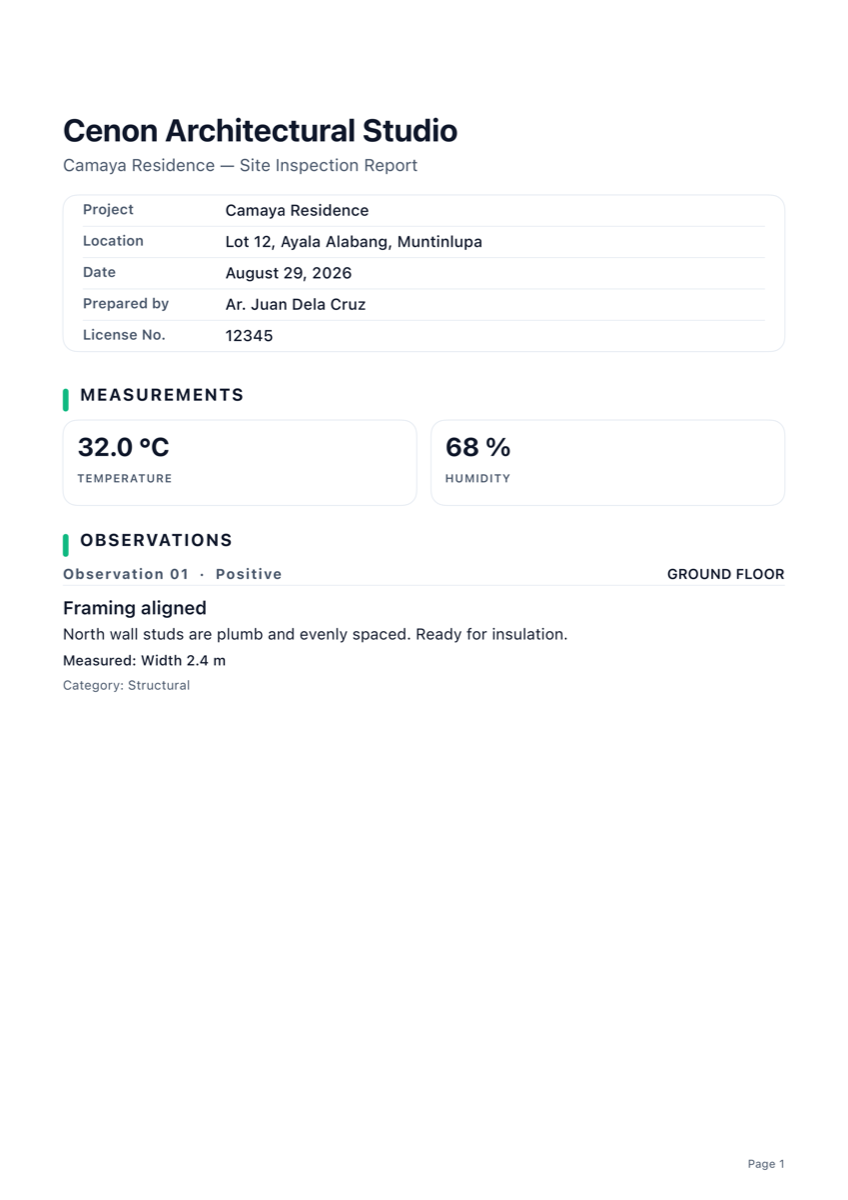
Standard
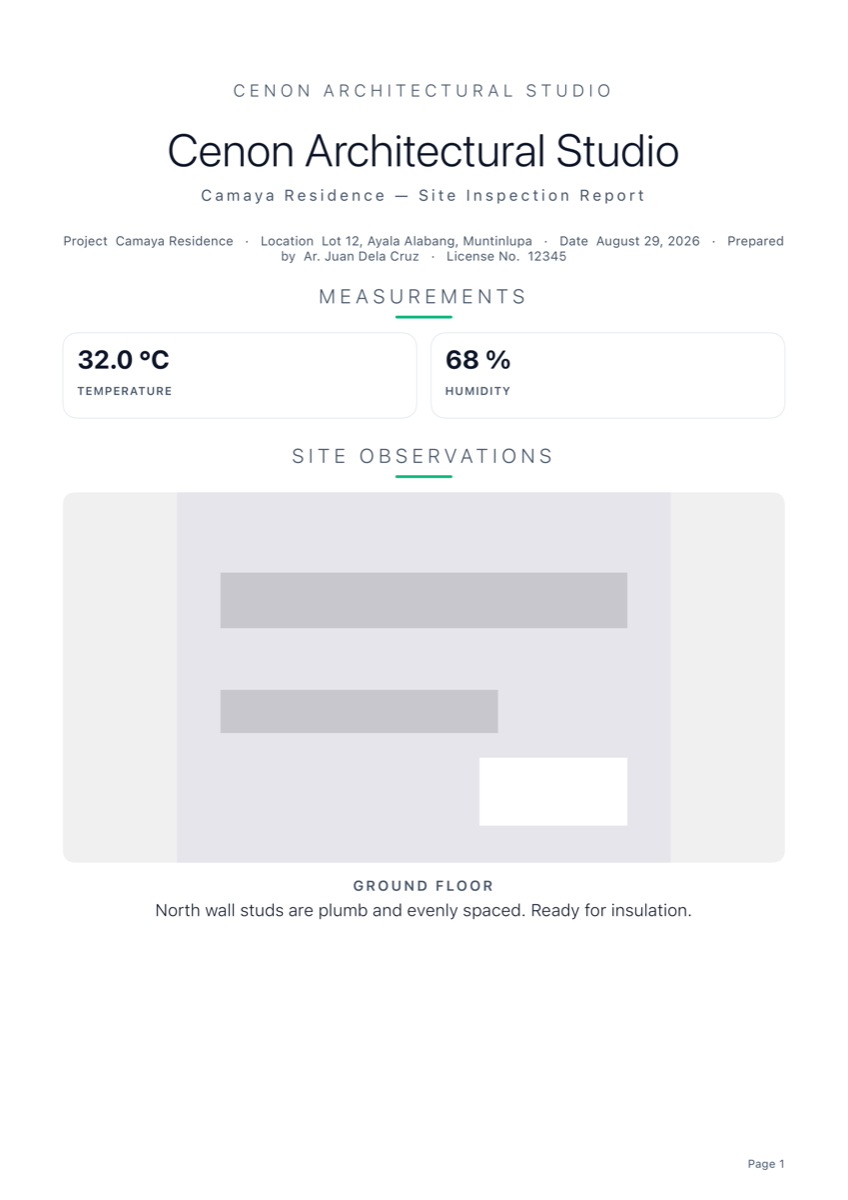
Executive
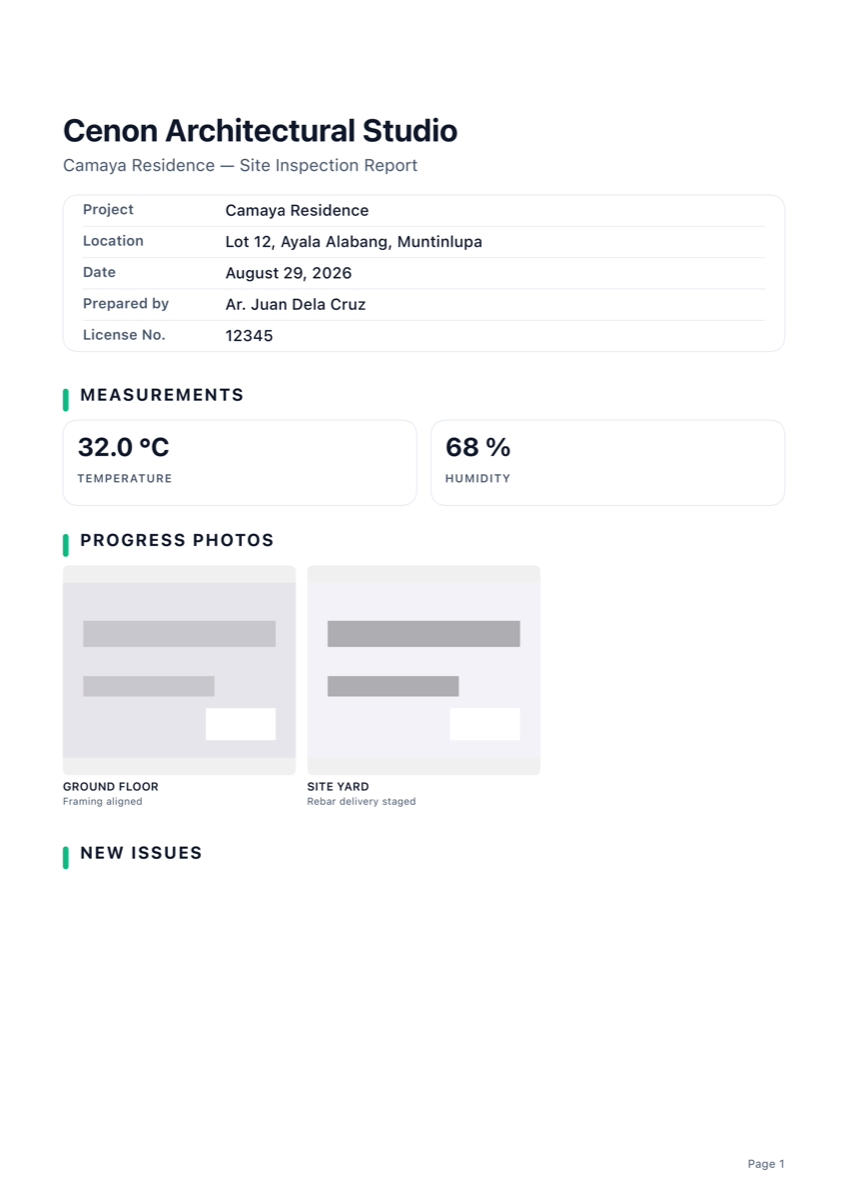
Progress
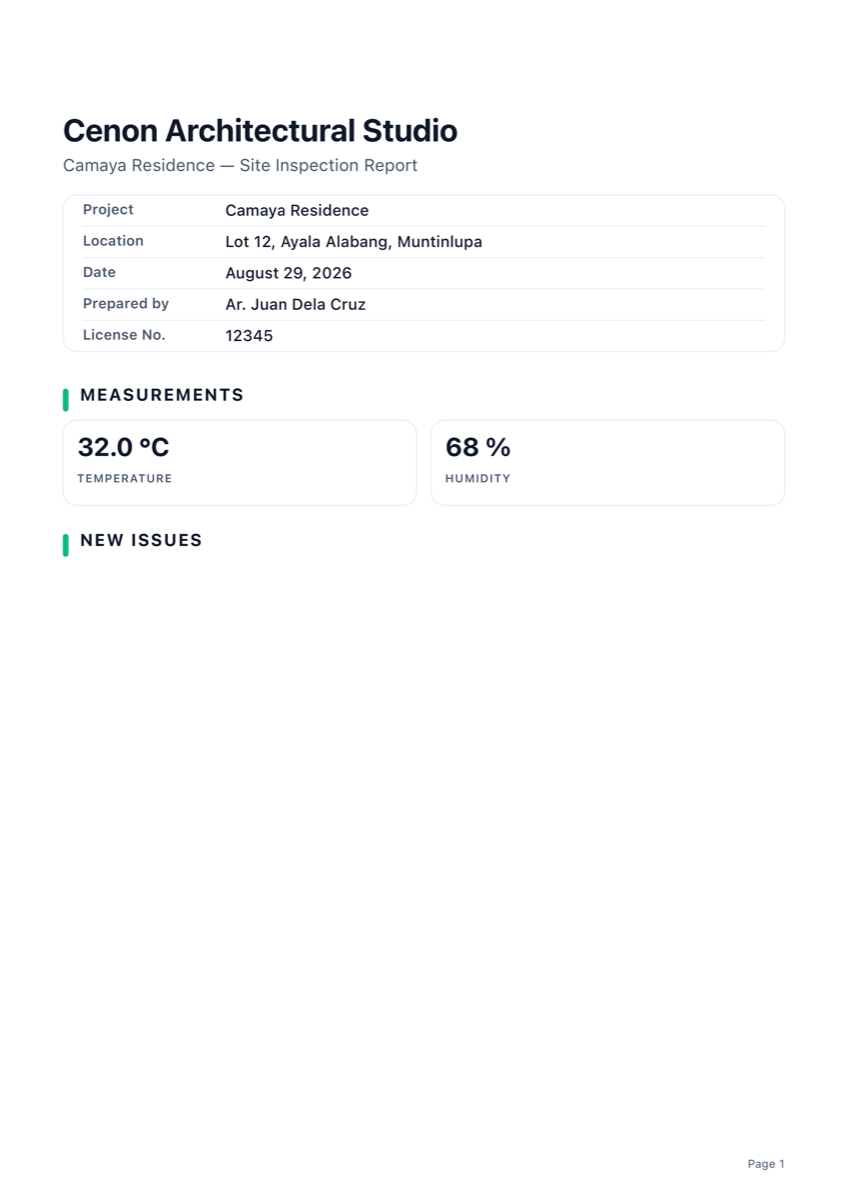
Inspection
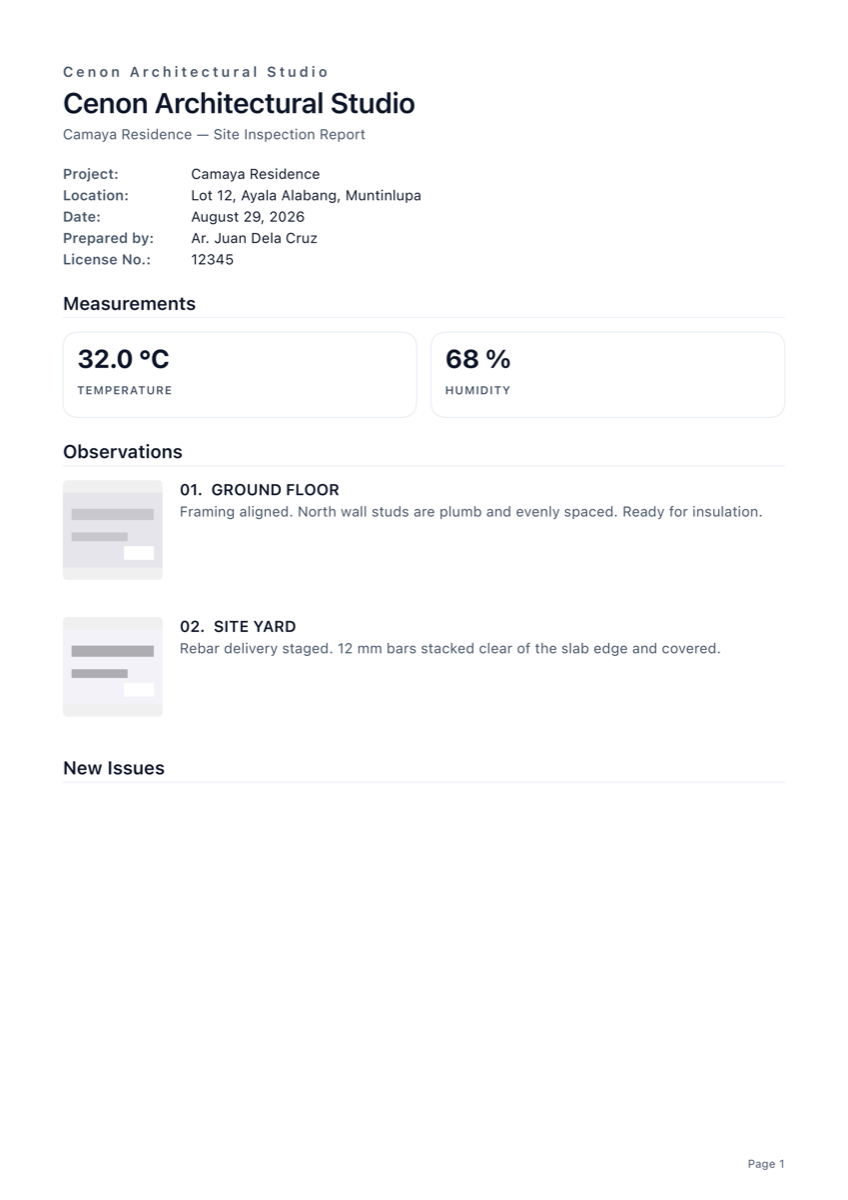
Minimal
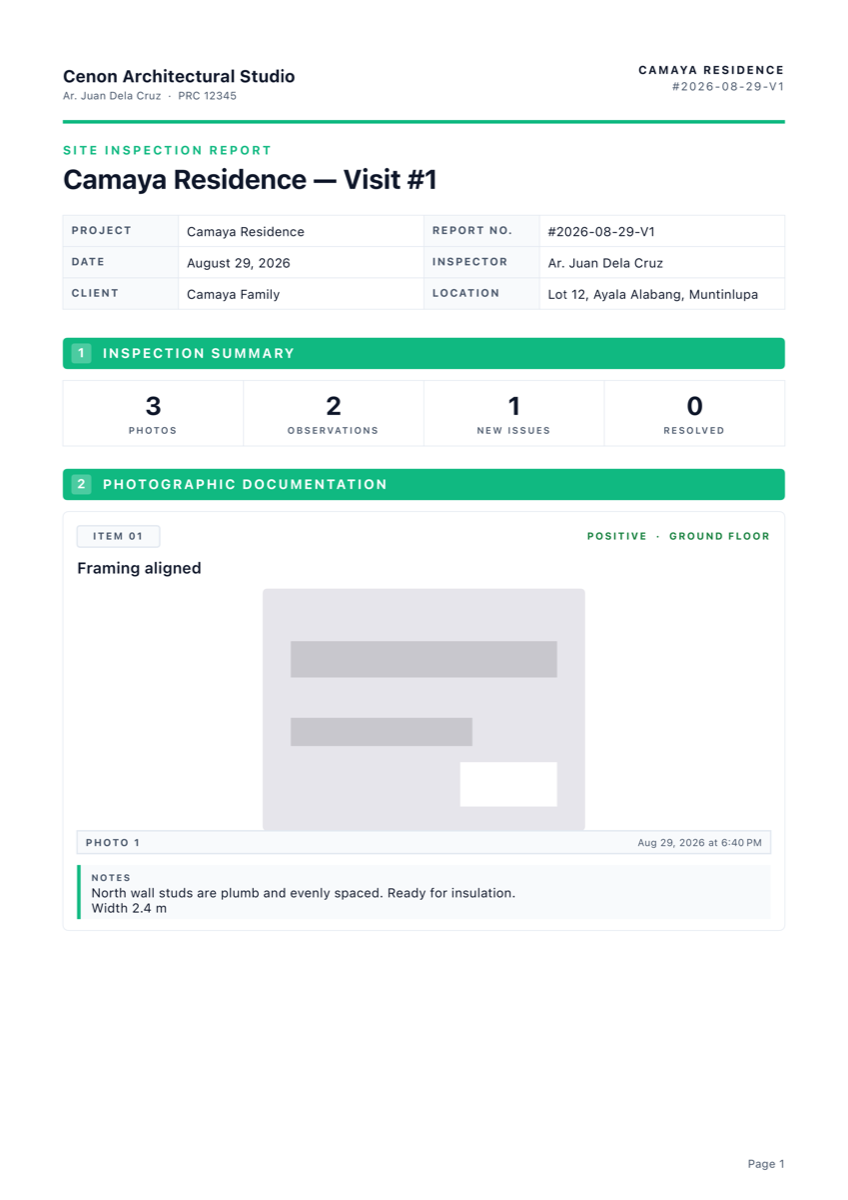
Field report
A week at a time
One report for the whole week, or the whole team
Clients rarely want a document per walk. Pick this week, last week, or any two dates, and Sayt merges every visit in that range into one report — renumbered in order, each item stamped with the day it was recorded so nothing loses its place.
It works across people as well as days. Everyone on the job types the same team code — no accounts, nothing sent anywhere, the code itself is what makes it one job — and their visits come back into it, renumbered on arrival so five people who each recorded “Visit 1” do not collide.
The Team screen shows who has sent what and when they were last on site, takes in a batch of files at once, and turns the lot into one report that says who recorded each finding.
- This week, last week, or a custom range you choose
- Every observation and issue in the period, in the order the work happened
- Each item labelled with the day it was recorded
- Same templates, colours and preview as a single-visit report
- One team code, typed on each phone — no accounts, no server
- See who has sent what, and who was last on site
- Every finding in a group report says who recorded it
- Take in several visit files at once, not one at a time
Free covers ten weekly reports and ten custom-range reports. Pro removes the limit.
Catching up
The walk you did not write up yet
Nobody documents everything on site. You photograph the job, and the write-up happens that evening, or on Monday, or when the client finally asks. Sayt is built for that instead of pretending otherwise.
Write observations up whenever you get to them. Log a visit that already happened and upload the photos you took on the day — they keep their real capture date, because that date is the evidence, not the moment you typed the note.
- Write up photos days later without losing when they were taken
- Log a past visit and upload that day’s photos to it
- A visit recorded long after the fact says so on the report, plainly
- Past visits are listed by their date, not squeezed into the numbering
Sayt states what happened and leaves the judgement to you. A write-up done long after the walk is disclosed on the report itself, and that disclosure cannot be switched off. If a photo's capture date does not match the visit you are filing it under, Sayt says so at the time, while you can still pick a different one.
Measure
Dimensions without a tape
Tap Measure on a finding and point the camera at what you need sized. Set the two ends and Sayt reads the distance off the camera — a ceiling height, a crack, the width of an opening — then writes it onto the finding, as shown here.
Chain several lines around an opening, a floor or a patch of damage. Close the shape and Sayt calculates the enclosed area, so "how much render needs replacing?" is answered on site rather than estimated later.
- Lengths and enclosed areas, both saved to the finding
- On iPhones with LiDAR, Sayt ranges against real geometry — noticeably more accurate on irregular surfaces. Without it, it measures against detected planes
- Metric or imperial, switchable at any time
- Every measurement carries into the report
- Type one in by hand when you already know the number
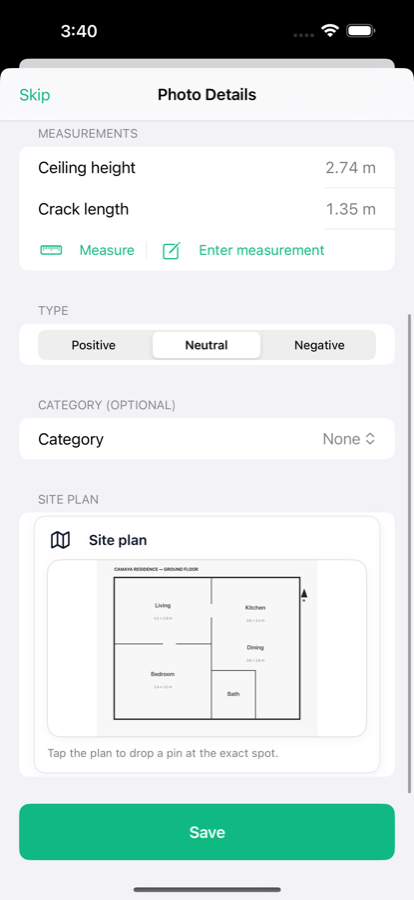
The ruler
A tape measure drawn onto the wall
Point the phone and Sayt lays a graduated ruler along whatever you measured, with the graduations numbered like a real tape. Each side of a chained shape keeps its own length, so a window comes back as four figures rather than one.
It tells you what it has locked onto — Vertical surface or Horizontal surface — so you know the reading is coming off the wall you meant, not the ceiling behind it.
- Graduated ticks and numbers along every line
- Each side of a shape labelled with its own length
- Tap the value to flip between metric and imperial
- Every figure marked ≈ — an estimate, and it says so
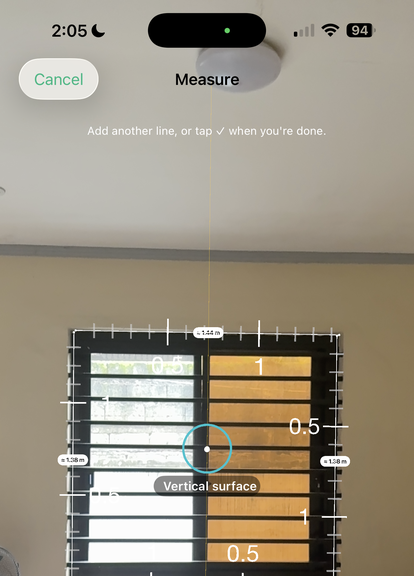
Camera measurements are digital estimates and are marked with ≈. They are accurate enough to size an opening, scope a repair or brief a trade — but they are not survey-grade. Check critical dimensions with a tape before ordering material or cutting anything.
Site plans
Pin the finding to the exact spot
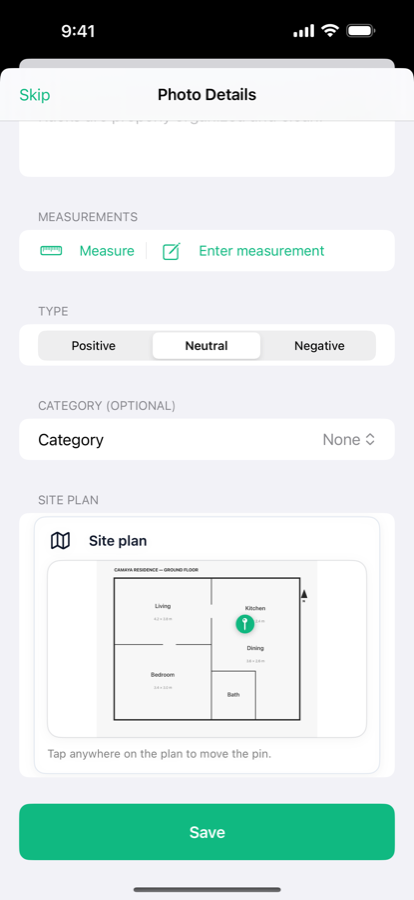
Import the floor plan and tap it to drop a pin where the photo was taken. The reader stops guessing which of four identical units, or which end of a corridor, the crack is in.
Pins are repositionable until you save, so getting it right takes a second. Every pinned plan carries through to the report alongside the photograph and its measurements.
- Use any plan you can get onto the phone — PDF page or photo
- One pin per finding, placed by tapping the plan
- Plan and pin appear in the exported report
Calendar
Every visit, and the next one
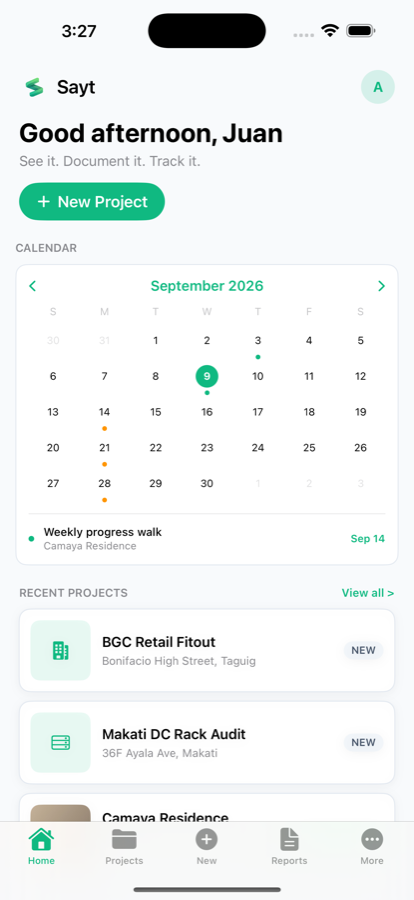
The home screen opens on a month calendar marking every day you documented something. Tap any day to see exactly what was recorded on it — the photos, the findings, the measurements — so a job reads back as a storyboard rather than a pile of files. Progress stops being a feeling and becomes a record you can show a client: day one against today.
Schedule the next visit while you are still standing on site. One-off, daily, weekly, fortnightly or monthly, with a reminder before you are due.
- Marked days for visits already documented
- Repeating schedules — daily, weekly, fortnightly or monthly
- A local reminder before you are due on site
- Tap any day to replay what was recorded on it
- Day one against today, as a record rather than a recollection
Who it's for
If your day ends with a report, it was built for you
Sayt is not an architect's app that other trades can borrow. You pick your role the first time you open it, and the categories, the report title and the words in the document all change to match the work you actually do and the people who actually read it.
Site & junior engineers
Often the person who has to write the daily report — and the person nobody showed how. Sayt supplies the structure: log what you saw as you see it, and the document assembles itself in a format your senior will sign without sending it back.
Civil & structural engineers
Categories that match the pour, not a generic list: earthworks, drainage, concrete, masonry — or foundation, rebar, formwork, column, beam and slab. Measure a section with the camera and the dimension lands in the report with the photo.
QA / QC checkers
The Punchlist table template gives you the numbered No. | Name | Description tabulation with photos embedded. Photograph the punchlist head office sent and Sayt reads it in — then work each item through open, in progress and verified.
Foremen, supervisors & construction managers
Cross-trade categories in one profile: civil, structural, architectural, electrical, mechanical, plumbing, safety. The Progress template turns a photo walk into weekly documentation with barely any typing.
Inspectors & regulators
Health, sanitary, food safety and fire profiles write violations, not "observations", under the right document title — the register your office and the establishment expect.
Safety officers (OSH)
Log hazards against PPE, fall protection, machine guarding, electrical safety, hazardous materials, housekeeping, signage and emergency response — with the photo attached and a required action recorded.
Architects
Layout, dimensions, finishes, doors and windows, ceilings, waterproofing and workmanship. Pin each observation to the floor plan so the client can see where it is without reading a paragraph.
Property inspectors & adjusters
Damage assessment, cause of loss, water, fire and storm damage — or roof, plumbing, HVAC, interior and exterior. The Inspection template leads on before/after evidence.
Same data, same app — different professional register:
Design & construction profiles:
Inspection & compliance profiles:
Not on the list? Pick the profile closest to your work, or Other — Sayt then takes its wording from the project type instead, so a restaurant still reads as a food safety report. You can change your profile at any time, and it only affects reports you generate afterwards.
And the rest of the walk
Capture
Photograph straight into the visit. Annotate with arrows, boxes and text. A built-in level helps you shoot elevations square.
Observations & issues
Log findings with location, category and priority, and track an issue through to verified.
Checklists
Work through a reusable checklist so nothing on a repeat inspection gets missed.
Reports
Export a PDF or an editable Word document carrying your name, licence number and logo.
Punchlist OCR
Photograph a punchlist your client or head office sent and Sayt reads it into checklist items or issues — no retyping. Numbered, bulleted and tabular lists are all handled, and you confirm each line before it is imported. Runs on-device. Pro.
Handoff
Send a whole visit to a colleague as a single file. It merges into their projects, renumbered on arrival, so several people reporting on one job consolidate instead of colliding. Pro.
Team
Everyone types the same team code and they are on the same job. Take their visits back in, see at a glance who has sent what, and report on all of it. Their photos, findings and issues merge into the project rather than arriving beside it. Read more. Pro.
Timestamps
Each photo can carry the date and time it was taken, under the image in the app and in the report, in your own time zone. Never burnt into the picture.
Sign-off
Your name, licence number and signature on the sheet — with an optional second “reviewed by” column. Both switch on and off as you export, not months earlier in settings.
Offline, always
No account, no server, no analytics. A basement with no signal is a normal working environment.
Free and Pro
Everything you need to walk a site and produce a report is in the free tier — measuring, plan pins, the calendar and PDF export all work without paying. Sayt Pro lifts the project limit and adds the editable Word export that teams tend to want.
Pro is a one-time purchase, not a subscription. Nothing renews. Pricing will be announced when Sayt reaches the App Store.
Free
No account, no trial period
- 3 projects, 5 visits each
- Photos, annotations and site plan pins
- Observations, issues and checklists
- Camera measuring, including areas
- Calendar and scheduling
- PDF reports
- Ten weekly and ten custom-range reports
- Ten reports on the branded template
Sayt Pro
One-time purchase — not a subscription
- Unlimited projects and visits
- Editable Word (DOCX) reports
- No report watermark
- Share and import visit files
- Run a job across a team, and report on all of it
- Save site photos to your library
- Unlimited weekly and custom-range reports
- Log a visit that already happened
- Six report templates, unlimited
- Trash, so deleted visits and projects come back
iOS and Android beta
Join on the phone you use on site
Sayt is now built for both sides of the crew: iPhone users can install through TestFlight, and Android testers can join the Google Play closed testing list. Testing is free and you can leave at any time.
- iOS installs through TestFlight; Android installs through Google Play testing
.saytpackproject and visit handoff works across iPhone and Android- Builds arrive through the normal beta channel as they are released
- Report a bug straight from TestFlight, or email us at saytappph@gmail.com
Beta builds are pre-release software. Test them on real work if you like — that is the most useful feedback — but keep your own copy of anything critical. TestFlight builds expire after 90 days, and Sayt Pro purchases made during the beta go through the platform sandbox rather than being charged. See the iOS Privacy Policy and Android Privacy Policy.
Feedback
Tell me what you think
Sayt is built by one person, and the beta exists to find out whether it actually helps on a real site. If you have tried it — even if you opened it once and put it down — the three minutes it takes to answer this genuinely decides what gets built next.
Three minutes, and every question is optional bar one:
What you do on site, how you write reports today, how far you got in the app, whether the report was good enough to send, what it is worth to you, and what annoyed you.
- No account needed, and you can leave your email out entirely
- "I would not pay for this" is a useful answer — say it
- Bug reports get read first
The form is hosted on Google Forms, so it opens in a new tab and Google will see that you opened it. Nothing on this site tracks you, and responses are only ever read by me. If you would rather not use it, just email saytappph@gmail.com instead.